

🍪

We value your privacy

We use cookies to enhance your browsing experience, serve personalized ads or content, and analyze our traffic. You can reject non-essential cookies or customize your preferences.

Select which cookies you want to allow:

NecessaryAlways active
AnalyticsHelp us improve
MarketingPersonalized ads

By accepting, you agree to the use of cookies as described in our privacy policy.

SimRacingPicker
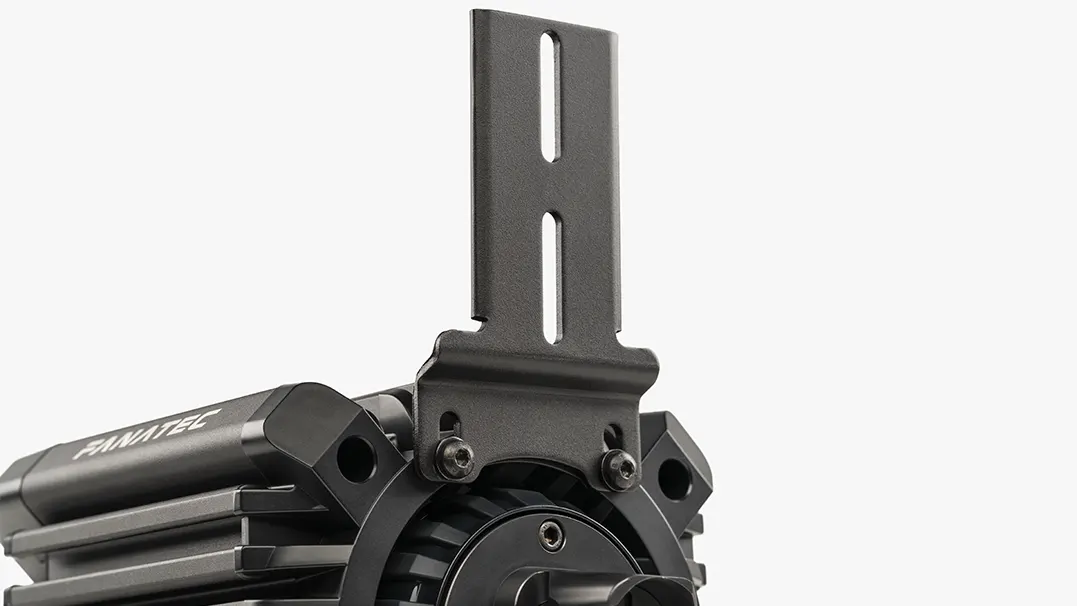
Fanatec XENEON EDGE bracket — touchscreen mounted on the front of a Fanatec wheel base
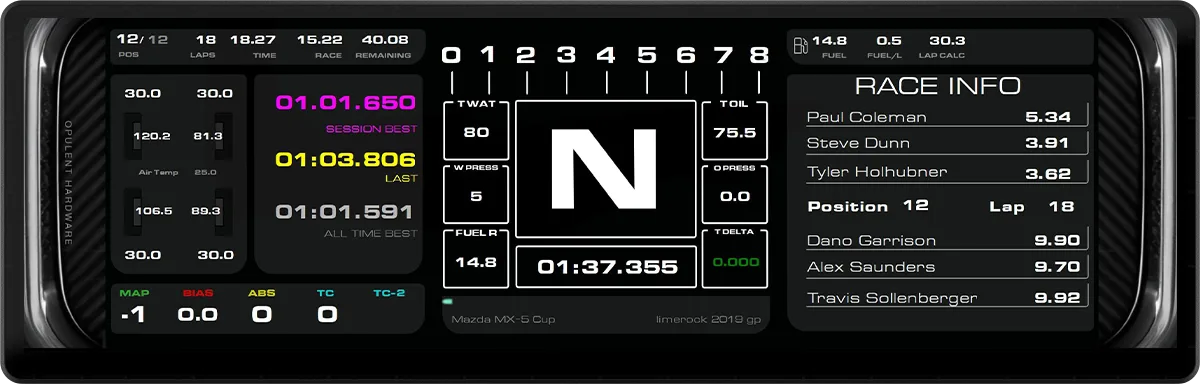
CORSAIR XENEON EDGE — SimHub racing dashboard on the 14.5-inch touchscreen
FanatecDashboard
pc

Fanatec XENEON EDGE + Mounting Bracket Bundle

14.5" 2560x720 touchscreen dash with steel bracket for Fanatec bases and profile rigs

Description

The Fanatec XENEON EDGE + Mounting Bracket Bundle pairs the CORSAIR XENEON EDGE 14.5" LCD touchscreen with the XENEON EDGE Mounting Bracket Set, a black powder-coated steel bracket Fanatec designed for sim racing rigs. Together they turn the screen into a telemetry dashboard or a touch-based virtual button box.

Display. The XENEON EDGE is a 14.5" AHVA (IPS-type) panel with a 2560 x 720 (32:9) native resolution, 60 Hz refresh rate, 350 cd/m² brightness and 5-point capacitive touch. It connects over HDMI or USB-C with DisplayPort Alt Mode and auto-rotates between landscape and portrait. Out of the rig it also works with its detachable magnetic stand, sticks to metal surfaces through built-in magnets and has two 1/4"-20 threaded mounting points.

Mounting bracket. The main bracket holds the screen in landscape or portrait. A height-adjustable front mount bolts to the front threaded holes of Fanatec wheel bases, placing the display between the wheel and the main monitor as an ultrawide dash. It is optimized for the ClubSport GT Cockpit Accessory Mount and fits most aluminum profile rigs, where a portrait side mount can work like a car's center console.

Software. Fanatec recommends running dashboards through the SimHub widget inside CORSAIR iCUE, which can show SimHub layouts alongside other iCUE widgets. The screen can also be set as a dedicated monitor in SimHub. The free version of SimHub is limited to 10 fps; a SimHub license unlocks 60 fps.

Compatibility. The display is listed as PC only. The bracket fits all Fanatec bases with front threaded holes and the ClubSport GT Cockpit with Accessory Mount.

Features & highlights

14.5" AHVA touchscreen, 2560 x 720 (32:9), 60 Hz
5-point capacitive touch
350 cd/m² brightness
HDMI and USB-C (DP Alt Mode) inputs
Landscape or portrait with auto-rotation
Black powder-coated steel mounting bracket
Height-adjustable front mount for Fanatec bases with front threaded holes
Optimized for ClubSport GT Cockpit Accessory Mount
Fits most aluminum profile rigs
Detachable magnetic desk stand and two 1/4"-20 mounts
SimHub widget in CORSAIR iCUE
Display and bracket bought together in one Fanatec bundle
Mounts directly to the front of Fanatec wheel bases
Works as a dashboard in landscape or a virtual button box in portrait
Steel bracket built to handle direct drive vibration

Driving style

The XENEON EDGE bundle suits PC sim racers who want more information and more inputs than their wheel offers. Mounted in landscape behind the wheel, its 2560 x 720 strip shows full SimHub dashboards (gear, RPM, delta, tire temps, fuel) in iRacing, Assetto Corsa Competizione, Assetto Corsa EVO, Le Mans Ultimate and rFactor 2. In portrait on the side of a profile rig, it becomes a touch button box for pit strategy, brake bias, TC/ABS maps and engine modes, which fits GT3 and endurance racing where black-box menus are used mid-stint.

It is less useful in rally, drift or short sprint formats where drivers rarely take a hand off the wheel, and it brings nothing to console players. Best for PC endurance and GT racers who want a configurable dash or touch button box on a Fanatec base or profile rig; less suited for console drivers and anyone who wants physical buttons with tactile feedback.

Build quality

Mid-range build

The XENEON EDGE has a matte black housing with built-in magnets, two 1/4"-20 threaded points and an AHVA panel that reviewers describe as solid and well finished, though the glossy screen surface shows reflections and fingerprints. The Fanatec bracket is black powder-coated steel, made to hold the display steady under direct drive vibration, with a height-adjustable front mount. The pairing is sturdy and practical but uses a consumer PC accessory display rather than a purpose-built, sealed motorsport dash.

Software

On Windows PC the display is set up through CORSAIR iCUE, which manages touch, rotation and widgets; Fanatec recommends adding the SimHub widget inside iCUE to show dashboards or virtual button layouts next to other iCUE widgets. Alternatively, SimHub can treat the XENEON EDGE as a Generic Monitor and launch a dashboard automatically per game; dashboards should be built at 2560 x 720 in Dash Studio. Touch buttons work by binding SimHub's simulated keys to in-game keybinds. The free SimHub version runs at 10 fps, while a SimHub license enables 60 fps.

There is no console support. On macOS iCUE is not supported, so the screen only works as a plain monitor without widgets. Elgato Stream Deck integration is also available for non-racing shortcuts.

Specifications

Screen Size14.5"
Mounting typeFanatec base front mount, ClubSport GT Accessory Mount, aluminum profile; landscape or portrait
Resolution2560 x 720 (32:9)
Refresh Rate60 Hz
Construction MaterialsBlack powder-coated steel bracket
Display TechnologyAHVA (IPS-type), 350 cd/m², 5-point capacitive touch
SoftwareCORSAIR iCUE (Windows), SimHub
ConnectivityHDMI, USB-C (DP Alt Mode)

Pros

  • Large 32:9 touchscreen fits wide dashboards and many touch buttons
  • Bracket mounts to Fanatec bases, ClubSport GT Accessory Mount or profile rigs
  • Portrait or landscape orientation
  • Sharp 2560 x 720 panel for its size
  • Single USB-C cable possible with a DP Alt Mode port
  • Doubles as a desk widget display off the rig

Cons

  • PC only, no console support
  • Full touch and widget features rely on iCUE (Windows)
  • Smooth 60 fps dashboards need a paid SimHub license
  • Usually needs two cables without a DP Alt Mode USB-C port
  • Glossy screen picks up reflections and fingerprints
  • Expensive compared with dedicated sim dashes or small monitors

What's in the box

  • CORSAIR XENEON EDGE 14.5" LCD Touchscreen (CC-9011306-WW) with magnetic desk stand
  • XENEON EDGE Mounting Bracket Set (CRD-9010010-WW)

Frequently asked questions

Does the XENEON EDGE bundle work on PlayStation or Xbox?

No. Fanatec lists the CORSAIR XENEON EDGE display as PC only, and the dashboard features depend on SimHub and CORSAIR iCUE, which run on Windows. The bracket itself fits Fanatec bases regardless of platform, but the screen will not show sim telemetry on a console.

Which wheel bases and rigs does the mounting bracket fit?

Fanatec states the bracket fits all Fanatec bases with front threaded holes, using its height-adjustable front mount, and the ClubSport GT Cockpit with Accessory Mount. It also fits most aluminum profile rigs, where it can be side-mounted in portrait like a center console.

How many cables does the XENEON EDGE need?

It accepts HDMI or USB-C with DisplayPort Alt Mode. With a GPU or PC port that outputs video over USB-C, one cable can carry video and touch. Reviewers note most desktop GPUs lack that port, so a typical setup needs two cables (video plus USB for touch), and cable routing on the back puts some strain on the ports.

Do I need a paid SimHub license for smooth dashboards?

For smooth updates, yes. Fanatec notes the free SimHub version is limited to 10 fps, while a licensed version enables 60 fps, matching the display's 60 Hz refresh rate. The free version still works for testing layouts and slower-changing data.

Can the XENEON EDGE work as a touch button box?

Yes. The 5-point capacitive touchscreen can run SimHub button box layouts, and Corsair says portrait orientation works best for its ACC button box template. Each touch button sends a simulated key that must match your in-game keybind, and bindings must be updated in SimHub if you change them in the game.

Should I use the iCUE SimHub widget or set it up as a separate monitor?

Fanatec recommends the SimHub widget inside CORSAIR iCUE, which lets you size the dashboard (S to XL) and keep other iCUE widgets on screen. As a separate monitor, SimHub treats it as a Generic Monitor and can auto-launch a dashboard per game; build those dashboards at 2560 x 720.

Will the bracket hold the screen steady with a direct drive base?

The bracket is black powder-coated steel, and Fanatec says it is built to handle vibration from high-torque direct drive wheel bases. Independent long-term reports on rigs are still limited, so mounting to a stiff cockpit or the ClubSport GT Accessory Mount is the safest option.

Are there known downsides reported by reviewers?

Reviewers praise the build quality and sharp panel but point to the glossy finish picking up reflections and fingerprints, no physical buttons or on-screen menu, and long-standing iCUE software complaints. On macOS iCUE is unsupported, so the screen works only as a plain monitor.

How does it compare with a wheel-integrated display or a Stream Deck?

A wheel display shows a few key values in your line of sight, while the XENEON EDGE adds a much larger 2560 x 720 area for full dashboards or many touch buttons without changing your wheel. Fanatec also mentions Stream Deck as an alternative; it gives physical keys but far less screen area for telemetry.

What warranty does the bundle have?

Fanatec's product page lists a three-year warranty with a zero dead pixel guarantee, backed by CORSAIR technical support. Some reviews list a two-year warranty for the display, so check the terms for your region and retailer before buying.

Is the bundle worth it compared with buying the parts separately?

The bundle costs $299.98 at Fanatec US. The bracket set alone sells for €39.95 in Europe, and reviewers place the display around $250, so the bundle mainly saves the hassle of buying both. Reviewers consider the display itself pricey for its function, so it makes most sense if you will use SimHub dashboards or touch buttons regularly.

Is the screen bright and sharp enough for a sim rig?

The AHVA panel is rated at 350 cd/m² with 178° viewing angles and about 183 PPI, which reviewers describe as crisp for its size. Its glossy surface can reflect room lights, so placement relative to windows and lamps matters.
Fanatec XENEON EDGE Bundle — 14.5" sim racing touchscreen